Wix AI Website Builder (2026): Aria, Harmony and What Replaced ADI
Field notePublished Sep 4, 2026
The Wix AI website builder in 2026 is three things in one product: a chat that drafts a whole site from a description of your business, an AI agent called Aria that keeps editing with you, and Harmony, the hybrid editor Wix announced on 21 January 2026, where you move between prompting and dragging elements by hand. It is free to start without a card; your own domain starts at Light, $17 a month billed yearly, and taking payments starts at Core, $29. It sits fourth of six on our ranking of AI website builders, and that placing is mostly about the platform underneath the AI.
This edition is built from Wix's own help centre, product pages and plan page, read on 9 October 2026 from a US session, plus Wix's January press release for the Harmony date. Where Wix does not document something, we say so rather than guess.
Wix AI workflows, mode by mode
Searches for Wix ADI still land here, so start with the history. Wix's help centre says that as of 10 November 2024 it no longer supports sites created with ADI, and that the Wix AI Website Builder replaced it. Published ADI sites now open in the Wix Editor; ADI sites that were unpublished and inactive for at least six months during the transition were deleted. Our Wix ADI review covers that change in more detail.
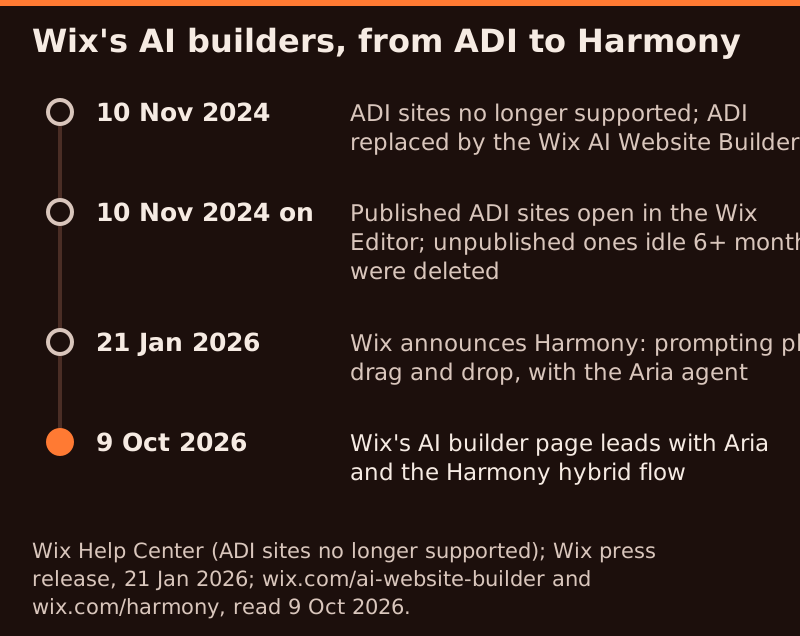
Harmony arrived on 21 January 2026. Wix's press release called it its new flagship AI website builder, said it would roll out in English over the following weeks, and put Aria at its centre. Wix's own Harmony page sums it up as "where vibe coding meets drag and drop freedom". On 9 October 2026, the AI website builder page leads with the same hybrid idea: describe a site, then customise it by hand or with Aria.
Affiliate link. We may earn a commission — it never moves a ranking.
1. The AI website builder chat
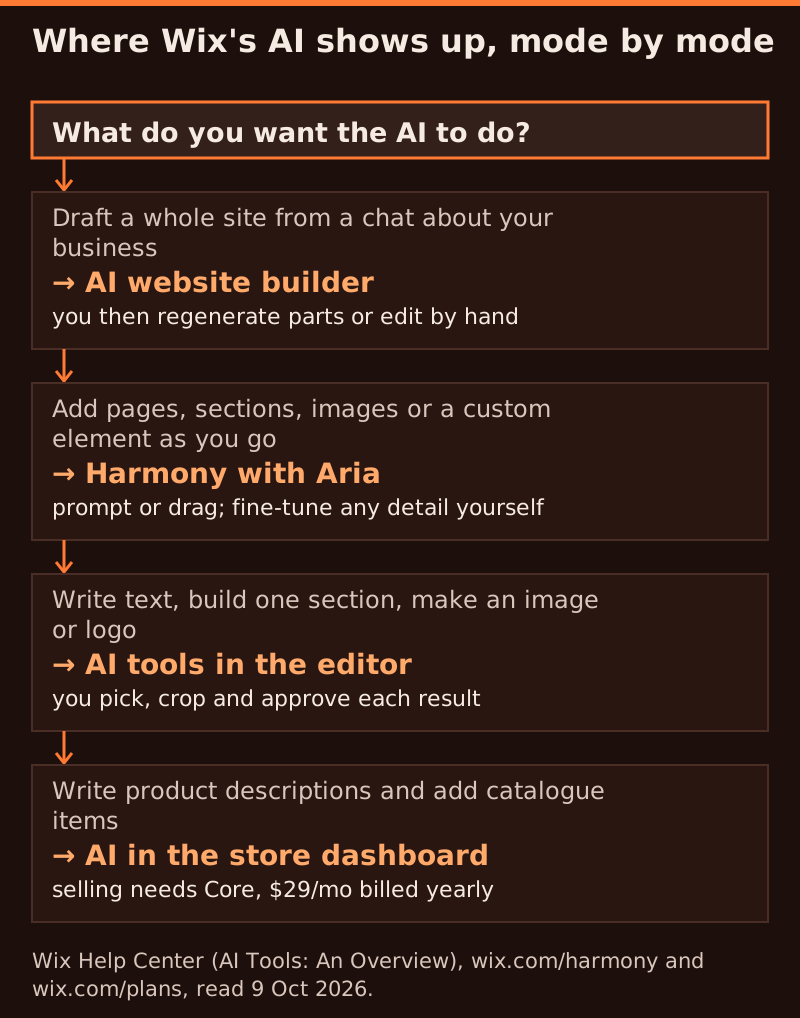
Wix's help centre describes the starting flow as a chat that asks about your preferences, such as design style and the features you need, then creates a personalised site. You can change parts of it or regenerate the whole thing, and then customise it fully in the editor. Wix's AI builder page breaks the same flow into four steps: describe your vision, let the AI build the site with business tools for your industry, make it yours with Aria and drag and drop, then publish with a custom domain.
2. Harmony and Aria
Harmony is where the AI stays switched on after the first draft. Wix's page says Aria can generate pages, sections and images as you go, handle complex tasks and batch edits, and answer questions such as "Is my site accessible?" or "How do I connect my domain?" It also says you can describe a feature that is not in the library and have AI generate it, giving 3D product viewers and before-and-after sliders as examples. Templates remain an alternative way in: pick one and the AI tools are available once you reach the editor.
3. AI tools inside the editor
Wix's overview of its AI tools lists several narrower helpers. Click any text to get suggested copy or ask Aria to rewrite it. Describe a section, such as an About Us block, and the AI builds it to match your design. Describe an image and pick a style to generate one, regenerate it as often as you like, then refine it in Photo Studio. A logo maker asks about your business and style and returns options to edit. There is also an AI tool that creates CMS collections from a name and a short description.
AI animations and design tools
Wix's pages do not describe a separate AI animation generator. Harmony's page lists scroll effects and animations inside its library of components and graphics, alongside AI-generated visuals with background removal and auto-enhance, and site-wide styling where a font or colour change ripples across every page. So animation on Wix is something you choose and tune from the library, while the AI's job is generating the sections and visuals those effects are applied to. If you want motion design as the main event, a design-first tool suits better; our Framer AI review covers that route.
AI in Wix ecommerce
Wix's AI builder page says the generator can produce an online store with product galleries, payment integration and inventory tools, and Aria's suggested prompts include "Add a new product to my catalog". In the store dashboard, an AI tool writes product descriptions and offers several variations. The plan rule matters more than any of that: Light does not list accepting payments, so a store needs Core at $29 a month billed yearly, with basic eCommerce. Business at $39 lists standard eCommerce and Business Elite at $159 advanced eCommerce. Our guide to whether AI can build an ecommerce site compares Wix's store route with the other builders on our ranking.
Affiliate link. We may earn a commission — it never moves a ranking.
The plan ladder behind the AI
Creating a site is free, and the free plan publishes on a username.wixsite.com/sitename address. Wix says a Premium plan is what connects your own domain and removes Wix branding. These are the US prices on Wix's plan page on 9 October 2026, which shows yearly subscriptions paid in full, before tax:
| Plan | Per month, billed yearly | Storage | What it adds |
|---|---|---|---|
| Free | $0 | Not stated | AI builder, wixsite.com address, Wix branding |
| Light | $17 | 2 GB | Your own domain, 2 collaborators; no payments |
| Core | $29 | 50 GB | Accept payments, basic eCommerce, 5 collaborators |
| Business | $39 | 100 GB | Standard eCommerce, 10 collaborators |
| Business Elite | $159 | Unlimited | Advanced eCommerce, developer platform, 100 collaborators |
Three pieces of fine print change the real cost. Paid yearly plans come with a voucher for one year of a free domain, which must be redeemed within 60 days of buying the plan and only works for a new domain. After that first year, a .com through Wix renews at $21.35 a year, according to Wix's own domain pricing article. And Wix's 14-day money-back guarantee covers new Premium plans only, not renewals or domains. Wix's plan page says other billing periods exist but does not show monthly prices, so we do not quote any.
What we would do with the draft
The AI builder costs nothing to try, so use the free plan as a rehearsal. Go in with a written brief rather than one sentence; our guide to AI website builder prompts shows the difference. When the draft arrives, check the structure before the styling: page order, section order and what each page is for. Because Wix will not swap a site onto a different template later, regenerating now is cheap and rebuilding later is not. When the bones are right and you want your own address, connect your domain on Light, the cheapest plan that does it.
Decide about payments before launch. Light takes no money, so selling products, charging deposits or paid bookings all mean Core at $29 a month billed yearly, $12 more each month than Light. Moving up later is possible, but pages built around a no-payments site often need rework. If money will ever move through the site, start on Core rather than upgrading into it.
Where this build goes wrong
The founder with a moodboard
If you have a precise look in mind, Wix's template commitment will chafe. Harmony gives more hand control than the old flow, but Framer is built around a design canvas, and its Basic plan is $10 a month billed yearly. You can test Framer's free plan before you commit to either.
The buyer reading the invoice
Wix is not the cheapest route to a simple site. Hostinger's builder is $2.99 a month only when you prepay 48 months, $143.52 at checkout, and it renews at $10.99 a month; the first year includes a domain and mailboxes. Our Hostinger AI review runs that sum in full. You save money and give up the App Market.
The site that is really an application
Logins, dashboards and customers who each see their own data are app requirements. On Wix they mean workarounds; a code generator handles them natively. Our Lovable review covers the tool we rank highest for that job.
Questions we get about the Wix AI builder
Is Wix ADI still available in 2026?
No. Wix stopped supporting ADI sites on 10 November 2024 and replaced ADI with the Wix AI Website Builder. Published ADI sites now open in the Wix Editor. You cannot go back to ADI, and changes that were never published in ADI were not carried over.
Is the Wix AI website builder free?
Yes, to build and publish. The free plan includes the AI builder, needs no card, and publishes on a username.wixsite.com address with Wix branding. Connecting your own domain starts at Light, $17 a month billed yearly, before tax.
What is Wix Harmony?
Harmony is the hybrid editor Wix announced on 21 January 2026. You can prompt Wix's AI agent, Aria, to generate pages, sections, images or custom elements, and drag and fine-tune anything by hand on the same page. Wix's AI builder page now leads with this flow.
Can the Wix AI builder make an online store?
Wix says the generator can build a store with product galleries, payments and inventory tools, and an AI tool writes product descriptions. To take money you need Core at $29 a month billed yearly; Light cannot accept payments.
Can I change my Wix template after the AI builds the site?
No. Wix's help centre says you cannot switch an existing site to a different template. You can create a new site and move your plan and domain to it, but designs, layouts and many apps do not transfer. Check the structure before you build on it.
See how this stacks up against the field in our best AI website builders ranking, or check how we test.